Pose and plan
Walks through examples/basics/demo.py
— a Franka Panda in a small USD factory cell, live in the studio.
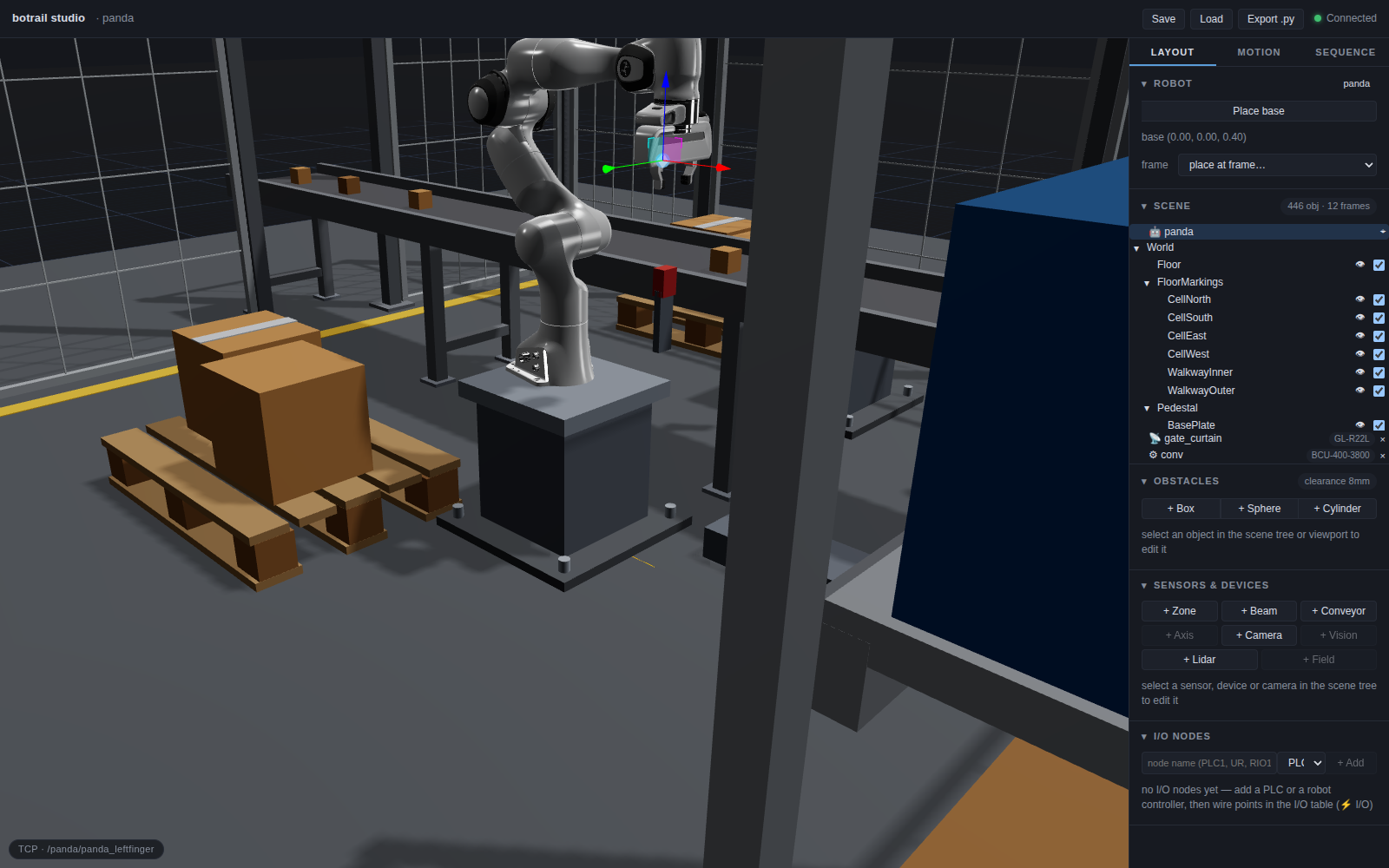
The first run downloads NVIDIA's official Isaac Sim Franka asset (~10 MB) into
the botrail cache, and the cell's equipment from the model catalog (a few
hundred kB — pip install botrail[catalog] if you have not already); after
that it starts instantly. Then the studio opens with the arm standing on its
pedestal, and everything below is live.
A USD robot
The robot is not a URDF conversion — it is the Isaac stage itself, loaded as an articulation:
fetch_franka() is nothing magical: it downloads franka.usd and the sublayers
it references into ~/.cache/botrail/ (or BOTRAIL_CACHE_DIR), once. Link and
joint names are the prim paths (/panda/panda_hand, …), revolute limits are
converted from degrees, and Y-up stages are re-modeled as Z-up.
Two notices print during the import, and they are expected:
botrail: usd robot import: /panda/panda_hand/panda_finger_joint2: mimic joint
    authored on `rotX` but the joint moves about `transX`; ignored
botrail: usd robot import: /panda/rootJoint: unsupported joint type `PhysicsJoint`; skipped
botrail says what it skipped rather than silently dropping it. The asset authors its finger mimic about the wrong axis, so the two fingers stay independent joints here — which is why the demo's ready pose has nine values, seven arm joints plus both fingers:
The cell, and mounting the robot on it
The environment is one hand-authored USD layer, and it comes in with one call:
scene = bt.Scene(robot)
scene.load_usd(Path(__file__).parents[1] / "assets" / "factory.usda")
scene.set_robot_base_pose(*scene.frame("/World/MountFrame"))
load_usd turns the stage's geometry into obstacles and its leaf Xform prims
into named frames. /World/MountFrame is the top of the pedestal, authored
into the cell exactly so that the robot can be placed with one line — move the
pedestal in the USD, and the robot moves with it.
The same cell also authors /World/Conveyor/PickFrame and
/World/Pallet/PlaceFrame: the two taught stations. Keeping teach points in
the layout file, not in the program, is what makes the next part work.
The equipment, ordered
What that layer does not model is the belt, the rack, the guarding, the control cabinet or the light curtain over the vehicle gate. Those are standard products bought to size, so they come from the model catalog instead — five products, each ordered by a generator handed a catalog id (the guard takes two calls, because two things cross the perimeter and each opening breaks the run; the curtain then watches the gate opening the fence cannot close):
    # A 3.8 m belt, 400 mm wide, its top at 0.55 — the height the taught pick
    # frame was authored against. `conv` is a device as well as a body: the
    # transport zone comes with it, so a sequence only has to start it.
    bt.parts.conveyor(scene, "conv", catalog=CONVEYOR, length=3.8, width=0.4,
                      position=(-0.45, 0.62, 0.55), speed=0.15)

    # A 900 x 450 bay of four decks, stood across the east side. Its stock
    # sits on the frames the generator leaves at the top of each shelf, so
    # moving the rack or taking a level out moves the goods with it.
    rack = bt.parts.rack(scene, "rack", size=(0.9, 0.45, 1.8), position=(1.55, -0.75),
                         catalog=RACK, levels=4, yaw=math.pi / 2)
    for level, size, colour in ((0, (0.28, 0.34, 0.24), CRATE), (1, (0.3, 0.36, 0.22), TOTE)):
        (x, y, z), _ = scene.frame(f"{rack.name}/level{level}")
        for i, across in enumerate((-0.22, 0.22)):
            scene.add_box(f"{rack.name}/stock/l{level}_{i}", size=size,
                          position=(x, y + across, z + size[2] / 2), color=colour)

    # The control cabinet, in the corner between the rack and the east
    # fence. An enclosure is a bought thing too: written here is the size
    # wanted, and the maker's matrix answers FZ40-616 — the body, its
    # plinth base and its mounting plate, three article numbers on the
    # bill. The stack light on its roof is drawn by hand: no catalog
    # package sells one yet.
    bt.parts.cabinet(scene, "cabinet", size=(0.6, 0.4, 1.6), position=(1.65, 1.55),
                     catalog=CABINET, base_height=0.1)
    for part, radius, length, z, colour in (
        ("mast", 0.018, 0.12, 1.76, (0.033, 0.038, 0.047)),
        ("green", 0.038, 0.07, 1.855, (0.023, 0.332, 0.061)),
        ("amber", 0.038, 0.07, 1.925, (0.686, 0.323, 0.005)),
        ("red", 0.038, 0.07, 1.995, (0.578, 0.018, 0.012)),
    ):
        scene.add_cylinder(f"stack_light/{part}", radius, length, (1.45, 1.55, z), color=colour)

    # 2 m of mesh guarding, in the two runs the openings leave, with the
    # personnel door on the south wall by the corner — off the walkway,
    # where somebody would actually walk in, and well clear of the gate the
    # vehicle uses. The panel widths are not written here: each edge is
    # filled with the fewest panels the catalog sells that reach the next
    # corner, and the two runs are the same product, so the bill adds them
    # into one line per width.
    bt.parts.fence(scene, "fence/east", path=GUARD_EAST, catalog=FENCE, height=2.0,
                   closed=False)
    bt.parts.fence(scene, "fence/west", path=GUARD_WEST, catalog=FENCE, height=2.0,
                   closed=False, door=(1, 0))

    # The vehicle gate is the opening the fence cannot close, so it is
    # watched instead: a safety light curtain across it, bought the way the
    # fence is. Body resolution (45 mm) and 925 mm are the nearest height
    # the series sells for a driveway, and GL-R22L is the line on the bill;
    # a span longer than the pair's operating range would be refused here
    # with the numbers. The columns stand just inside the posts, so the
    # 940 mm the vehicle needs stays clear, and the field is modelled as
    # one beam at shin height — low enough that a vehicle driving through
    # reads as an interruption, the way the real curtain's bottom beams
    # would (the muting that lets it pass anyway is not modelled). The
    # belt's opening keeps its plain window: a curtain there would trip on
    # every passing carton.
    bt.parts.light_curtain(scene, "gate_curtain", (-0.5, -1.92), (0.5, -1.92),
                           catalog=CURTAIN, resolution=45, height=0.925, beam_height=0.3)
Each one is checked against what the package actually sells: ask the fence for
1.8 m and it answers with the heights it has and stops. The panel widths are
never written down — each edge of a GUARD run is filled with the fewest
panels that reach the next corner — and the belt arrives as a device as
well as a body, so the next tutorial can start it without
declaring anything. What comes out the other end is a bill of materials with
part numbers on it:
| conveyor.belt       | botrail | BCU-400-3800     | 1  | 44.5 kg |
| structure.rack      | botrail | MR-900x450x1800  | 1  | 18.4 kg |
| structure.fence     | botrail | MG-2000x1500     | 5  | 16.0 kg |
| structure.fence.post| botrail | MGP-2000         | 18 |  7.0 kg |
| structure.door      | botrail | MGD-2000x800     | 1  | 15.6 kg |
Parts and the BOM picks that up.
Teaching grasps by IK
The teach frames are grasp poses — the point between the fingertips, tool axis along the approach. IK, though, solves for a link. So a taught pose is backed off along the tool axis to the hand frame first:
HAND = "/panda/panda_hand"
GRIP_DEPTH = 0.10


def hand_pose(pose, standoff: float = 0.0):
    """The ``panda_hand`` pose that lands the finger pads on ``pose``
    (a ``(position, quaternion)`` grasp frame), backed off by ``standoff``
    along the approach axis for a hover pose."""
    (x, y, z), quat = pose
    qx, qy, qz, qw = quat
    tool_z = (2 * (qx * qz + qw * qy), 2 * (qy * qz - qw * qx), 1 - 2 * (qx * qx + qy * qy))
    depth = GRIP_DEPTH + standoff
    return tuple(p - depth * a for p, a in zip((x, y, z), tool_z)), quat


def teach_grasp(scene: bt.Scene, pose, standoff: float = 0.0, robot: str = None) -> list:
    """Poses the robot so the gripper grasps at ``pose`` and returns the
    joint vector — the scripted form of dragging the studio's TCP gizmo.
    Raises when IK misses, rather than teaching a bad pose. ``robot`` names
    the instance (required once the scene has several)."""
    position, quaternion = hand_pose(pose, standoff)
    ik = scene.set_tcp_target(position, quaternion, link=HAND, robot=robot)
    if not ik.converged:
        raise RuntimeError(
            f"IK did not reach {tuple(round(v, 3) for v in position)}: "
            f"{ik.pos_error * 1e3:.1f} mm / {ik.rot_error:.3f} rad short"
        )
    return list(scene.joint_positions if robot is None else scene.joint_positions_of(robot))
teach_grasp is the scripted form of dragging the studio's TCP gizmo: solve
toward the pose, fail loudly if IK missed (rather than teaching a bad pose),
and return the joint vector. Passing standoff=0.15 gives the hover pose
150 mm above the same grasp. The later tutorials call this constantly — every
pick, place, and pallet course is taught this way, which is why moving a frame
in the USD re-teaches the cell for free.
Things to try in the studio
The scene in your Python process and the scene in the browser are the same object, so poke it from both sides:
- Drag the TCP gizmo — IK follows live, with the clearance readout and collision highlighting updating as you go.
-
Teach and plan a motion — in the Motion tab, pose the robot, + Joint, Plan motion, and scrub the preview in the timeline dock. The one-shot form from Python (the preview lands in the same dock):
-
Pose from the REPL — with
bt.studio(scene, block=False)you keep the prompt;scene.set_tcp_target(...)moves the browser's robot. - Save what you made —
scene.save_project("cell.botrail"), orscene.generate_python()for a script that rebuilds the scene (the header's Export .py button does the same).
The complete script
examples/basics/demo.py
"""botrail demo: a Franka Panda in a small USD factory cell.

The robot is NVIDIA's official Isaac Sim Franka asset (USD articulation);
the first run downloads it (~10 MB) into the botrail cache.

The cell comes from two places, which is how a real one is put together.
The *layout* — floor, pedestal, pallet, the goods on the line and the
poses the motions are taught to — is the hand-authored USD layer next to
this script. The *standard products* — the belt, the rack, the guarding,
the control cabinet, the light curtain over the vehicle gate — are ordered
from the model catalog below: they are bought to size, so what is written
here is a length and a number of levels, the generator refuses a size
nobody sells, and every one of them lands on the bill of materials with
the part number you would order it by.

Run with:  python examples/basics/demo.py [out.usda] [--studio]

Needs `pip install botrail[catalog]` for the equipment (the packages are
fetched from the Hugging Face dataset botrail/botrail-catalog and cached).
"""

import math
import os
import sys
import urllib.request
from pathlib import Path

import botrail as bt

ISAAC_FRANKA_URL = (
    "https://omniverse-content-production.s3-us-west-2.amazonaws.com"
    "/Assets/Isaac/4.2/Isaac/Robots/Franka"
)
# franka.usd plus the sublayers it references relative to itself.
FRANKA_FILES = [
    "franka.usd",
    "franka-LICENSE.txt",
    "Materials/Materials.usd",
    *(
        f"Props/panda_{part}.usd"
        for part in ("hand", "leftfinger", "rightfinger", *(f"link{i}" for i in range(8)))
    ),
]


def fetch_franka() -> Path:
    """Download the Franka USD asset into the botrail cache (once)."""
    cache = Path(os.environ.get("BOTRAIL_CACHE_DIR") or Path.home() / ".cache" / "botrail")
    dest = cache / "assets" / "franka"
    for rel in FRANKA_FILES:
        target = dest / rel
        if target.exists():
            continue
        target.parent.mkdir(parents=True, exist_ok=True)
        print(f"downloading {rel} ...")
        part = target.with_suffix(target.suffix + ".part")
        urllib.request.urlretrieve(f"{ISAAC_FRANKA_URL}/{rel}", part)
        part.rename(target)
    return dest / "franka.usd"


# ------------------------------------------------------- standard products

# Five catalog packages. Each one is a *spec pack*: no fixed mesh, but the
# sizes that are sold, the rules that govern them (how far apart a stand may
# stand, how close two shelves may be), the part numbers and the mass — plus
# a parametric drawing expanded to the size at hand, so a mesh panel is drawn
# as a frame with wire in it rather than a slab.
CONVEYOR = "botrail/conveyor/belt-unit"
RACK = "botrail/rack/medium-shelf"
FENCE = "botrail/fence/mesh-guard"
CABINET = "nito/fz/standard"
CURTAIN = "keyence/gl-r/series"

# The guard around the 4 m cell. It is not a loop but two open runs, because
# two things cross the perimeter and a run of panels can only stop at its
# ends: the belt comes in through the west edge (the corners at y 0.30 and
# 0.92 leave 560 mm between the posts, for a belt 460 mm over the rails),
# and the vehicle gate breaks the south one at x = +/-0.5 — 940 mm clear,
# which is what the AGV demo drives through.
#
# Every corner here is a length this fence can be built to: ask for a 1.1 m
# stub and it answers 1.08 or 1.12 and stops, because no run of panels and
# 60 mm posts comes to 1.1 m.
GUARD_EAST = [(0.5, -2.0), (2.0, -2.0), (2.0, 2.0), (-2.0, 2.0), (-2.0, 0.92)]
GUARD_WEST = [(-2.0, 0.30), (-2.0, -2.0), (-0.5, -2.0)]

# Crates on the bottom deck, totes on the one above (linear RGB, as USD).
CRATE, TOTE = (0.527, 0.254, 0.076), (0.028, 0.156, 0.392)


def equip_cell(scene: bt.Scene) -> None:
    """Orders the cell's equipment from the catalog and stands it where the
    USD layer sets the cell out."""
    # A 3.8 m belt, 400 mm wide, its top at 0.55 — the height the taught pick
    # frame was authored against. `conv` is a device as well as a body: the
    # transport zone comes with it, so a sequence only has to start it.
    bt.parts.conveyor(scene, "conv", catalog=CONVEYOR, length=3.8, width=0.4,
                      position=(-0.45, 0.62, 0.55), speed=0.15)

    # A 900 x 450 bay of four decks, stood across the east side. Its stock
    # sits on the frames the generator leaves at the top of each shelf, so
    # moving the rack or taking a level out moves the goods with it.
    rack = bt.parts.rack(scene, "rack", size=(0.9, 0.45, 1.8), position=(1.55, -0.75),
                         catalog=RACK, levels=4, yaw=math.pi / 2)
    for level, size, colour in ((0, (0.28, 0.34, 0.24), CRATE), (1, (0.3, 0.36, 0.22), TOTE)):
        (x, y, z), _ = scene.frame(f"{rack.name}/level{level}")
        for i, across in enumerate((-0.22, 0.22)):
            scene.add_box(f"{rack.name}/stock/l{level}_{i}", size=size,
                          position=(x, y + across, z + size[2] / 2), color=colour)

    # The control cabinet, in the corner between the rack and the east
    # fence. An enclosure is a bought thing too: written here is the size
    # wanted, and the maker's matrix answers FZ40-616 — the body, its
    # plinth base and its mounting plate, three article numbers on the
    # bill. The stack light on its roof is drawn by hand: no catalog
    # package sells one yet.
    bt.parts.cabinet(scene, "cabinet", size=(0.6, 0.4, 1.6), position=(1.65, 1.55),
                     catalog=CABINET, base_height=0.1)
    for part, radius, length, z, colour in (
        ("mast", 0.018, 0.12, 1.76, (0.033, 0.038, 0.047)),
        ("green", 0.038, 0.07, 1.855, (0.023, 0.332, 0.061)),
        ("amber", 0.038, 0.07, 1.925, (0.686, 0.323, 0.005)),
        ("red", 0.038, 0.07, 1.995, (0.578, 0.018, 0.012)),
    ):
        scene.add_cylinder(f"stack_light/{part}", radius, length, (1.45, 1.55, z), color=colour)

    # 2 m of mesh guarding, in the two runs the openings leave, with the
    # personnel door on the south wall by the corner — off the walkway,
    # where somebody would actually walk in, and well clear of the gate the
    # vehicle uses. The panel widths are not written here: each edge is
    # filled with the fewest panels the catalog sells that reach the next
    # corner, and the two runs are the same product, so the bill adds them
    # into one line per width.
    bt.parts.fence(scene, "fence/east", path=GUARD_EAST, catalog=FENCE, height=2.0,
                   closed=False)
    bt.parts.fence(scene, "fence/west", path=GUARD_WEST, catalog=FENCE, height=2.0,
                   closed=False, door=(1, 0))

    # The vehicle gate is the opening the fence cannot close, so it is
    # watched instead: a safety light curtain across it, bought the way the
    # fence is. Body resolution (45 mm) and 925 mm are the nearest height
    # the series sells for a driveway, and GL-R22L is the line on the bill;
    # a span longer than the pair's operating range would be refused here
    # with the numbers. The columns stand just inside the posts, so the
    # 940 mm the vehicle needs stays clear, and the field is modelled as
    # one beam at shin height — low enough that a vehicle driving through
    # reads as an interruption, the way the real curtain's bottom beams
    # would (the muting that lets it pass anyway is not modelled). The
    # belt's opening keeps its plain window: a curtain there would trip on
    # every passing carton.
    bt.parts.light_curtain(scene, "gate_curtain", (-0.5, -1.92), (0.5, -1.92),
                           catalog=CURTAIN, resolution=45, height=0.925, beam_height=0.3)


def build_scene(name: str = None) -> bt.Scene:
    """The factory cell with one Franka on the pedestal. `name` sets the
    robot's instance name — worth spelling out when a second arm joins."""
    robot = bt.Robot.from_usd(fetch_franka())
    scene = bt.Scene(robot, name=name)
    scene.load_usd(Path(__file__).parents[1] / "assets" / "factory.usda")
    equip_cell(scene)
    identify_layout(scene)
    # Stand the robot on the pedestal's mount frame, in a natural ready pose.
    scene.set_robot_base_pose(*scene.frame("/World/MountFrame"))
    scene.set_joint_positions([0.0, -0.785, 0.0, -2.356, 0.0, 1.571, 0.785, 0.035, 0.035])
    return scene


# --------------------------------------------------------------- grasping

# The cell's teach frames (PickFrame / PlaceFrame) are *grasp* poses: the
# point between the fingertips, tool +Z along the approach direction. IK,
# though, solves for a link — so a taught pose has to be backed off along
# the tool axis to the hand frame. On this Franka the palm hull ends 67 mm
# out and the fingertips reach 112 mm, so holding a box 100 mm out puts the
# pads across it with the palm clear of its top face.
HAND = "/panda/panda_hand"
GRIP_DEPTH = 0.10


def hand_pose(pose, standoff: float = 0.0):
    """The ``panda_hand`` pose that lands the finger pads on ``pose``
    (a ``(position, quaternion)`` grasp frame), backed off by ``standoff``
    along the approach axis for a hover pose."""
    (x, y, z), quat = pose
    qx, qy, qz, qw = quat
    tool_z = (2 * (qx * qz + qw * qy), 2 * (qy * qz - qw * qx), 1 - 2 * (qx * qx + qy * qy))
    depth = GRIP_DEPTH + standoff
    return tuple(p - depth * a for p, a in zip((x, y, z), tool_z)), quat


def teach_grasp(scene: bt.Scene, pose, standoff: float = 0.0, robot: str = None) -> list:
    """Poses the robot so the gripper grasps at ``pose`` and returns the
    joint vector — the scripted form of dragging the studio's TCP gizmo.
    Raises when IK misses, rather than teaching a bad pose. ``robot`` names
    the instance (required once the scene has several)."""
    position, quaternion = hand_pose(pose, standoff)
    ik = scene.set_tcp_target(position, quaternion, link=HAND, robot=robot)
    if not ik.converged:
        raise RuntimeError(
            f"IK did not reach {tuple(round(v, 3) for v in position)}: "
            f"{ik.pos_error * 1e3:.1f} mm / {ik.rot_error:.3f} rad short"
        )
    return list(scene.joint_positions if robot is None else scene.joint_positions_of(robot))


def identify_layout(scene: bt.Scene) -> None:
    """Pin what the hand-authored layout *is*: the pedestals, the pick
    sensor and the floor markings are equipment (bolted down), the pallets
    are carriers, the boxes and crates are stock. The BOM reads this, and
    so does a physics bake of the whole cell — equipment stays put while
    stock rests or falls (`physics_world_demo.py --scene demo`)."""
    for name in ("/World/Pedestal", "/World/PedestalFar"):
        scene.set_part(name, kind="group", category="structure.pedestal")
    scene.set_part("/World/Conveyor/PickSensor", kind="group", category="sensor.photoelectric")
    scene.set_part("/World/FloorMarkings", kind="group", category="structure.marking")
    scene.set_part("/World/CableDuct", kind="group", category="structure.cable_duct")
    scene.set_part("stack_light", kind="group", category="hmi.stack_light")
    for name in ("/World/Pallet", "/World/PalletFar"):
        scene.set_part(name, kind="group", category="pallet")
    for name in scene.obstacle_names:
        leaf = name.rsplit("/", 1)[-1]
        if leaf.startswith(("Box_", "Crate_")) and not leaf.endswith("_Tape"):
            scene.set_part(name, category="workpiece")


if __name__ == "__main__":
    args = [a for a in sys.argv[1:] if not a.startswith("--")]
    out = args[0] if args else "demo_cell.usda"
    scene = build_scene()
    print(scene.robot)
    # Nothing is baked here — the cycle is the next demo's — so what the
    # file holds is the cell as it stands: the robot on its pedestal and
    # every product ordered above, in one layer.
    warnings = scene.export_usd(out)
    print(f"wrote {out}" + (f" ({len(warnings)} warnings)" if warnings else ""))
    if "--studio" in sys.argv:
        bt.studio(scene)
Next
The cell is still scenery — nothing moves on its own. Pick from a moving belt gives it a conveyor, a photo-eye, and a sequence, and picks the box without stopping the line.