Vehicles and AMRs
An AGV is not a special kind of robot in botrail — it is a device, the same standing as a conveyor or a linear axis. That is how a cell PLC sees one: you send it a destination and wait for a completion signal. Everything else follows from that.
A cell of vehicles and conveyors needs no robot at all: bt.Scene() opens
empty, and the bake, the tracks, the studio and the USD export all run
without one. Everything robot-implicit (scene.robot,
set_joint_positions() without a robot=) answers by name — scene has
no robot; add one with add_robot — instead of assuming a first robot.
scene.add_vehicle(
    "agv",
    body=["/World/AGV"],                       # obstacles carried rigidly
    path=[(-2.6, -2.9), (0.0, -2.9), (0.0, -1.15)],
    stations={"warehouse": 0, "gate": 1, "dock": 2},
    speed=0.8, turn_speed=math.radians(45),
    start="warehouse",
)

sq.step("call", actions=[bt.seq.goto("agv", "dock")],
        transition=bt.seq.device_done("agv"))
goto is the dispatch order and device_done is "in position" — the same
pair a linear axis uses. The vehicle's moving state is an output lane on the
timing chart, next to the conveyors.
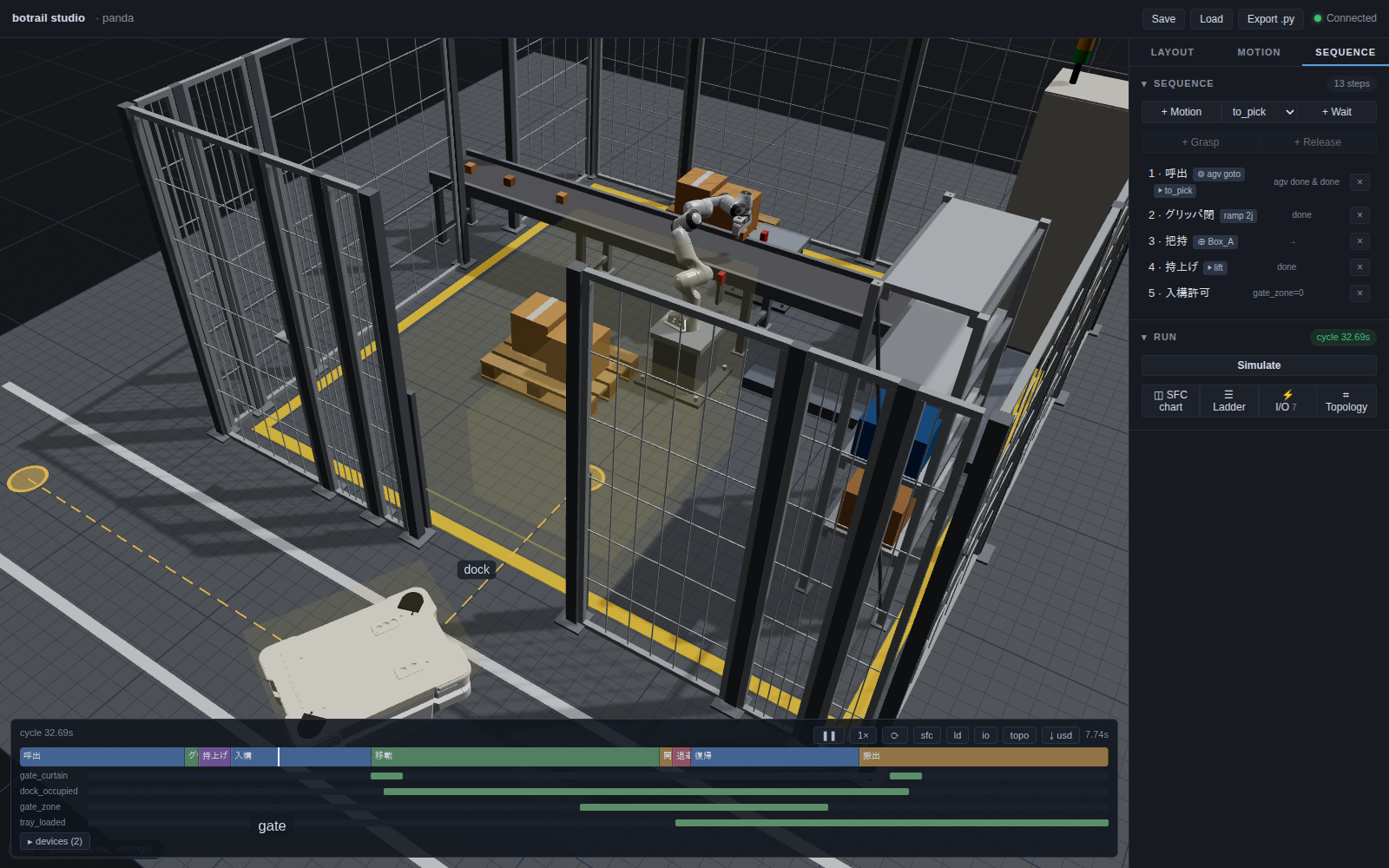
The studio draws the guide path on the floor with a marker at each station,
and the timing chart carries the vehicle's lane alongside the sensors it
handshakes with — here dock_occupied, gate_zone and tray_loaded.
Travel is authored, not planned
The path is the model of the tape on the floor. botrail does not plan
routes, avoid dynamic obstacles or run SLAM: it drives the path you taught
it, exactly, every time. That is the same bargain the rest of the tool makes
— determinism in exchange for scope.
Between waypoints the vehicle drives straight at speed; where the path
turns it pivots in place at turn_speed. Both bake to closed-form spans, so
any resample rate is exact. The arrival heading is the last leg's
direction, which means the waypoint before a station is what decides how
the machine docks.
Waypoints are (x, y) or (x, y, z) — z is the floor height on the
guidance surface, so a ramp climbs with its waypoints. The body stays level
(heading only; no pitch), cruise speed is spent along the 3D path, and a
path that climbs needs max_grade — the steepest rise over horizontal run
the machine may take (0.10 = 10 %). Without it only level paths pass
validation, and a slope is refused naming the waypoints and the angle. A
vertical stack of waypoints is never driven — that hop is a lift
edge: legal only when both ends sit in a lift's capture zone at its
stops (see lifts), ridden by commanding
the lift, and never walked by goto — a station across the edge is
refused with directions to drive to the near side, ride, and continue.
A drive that cannot pivot — turn_radius
A counterbalance forklift, an Ackermann axle, a tricycle steered short of
across: drive="steered" with a turn_radius (metres, the vehicle
frame's — the fixed axle's midpoint) rounds every corner instead of
pivoting. Where the gear holds through a corner the machine takes the
fillet arc tangent to both legs; where it changes — a station past the
corner demands forks first — it drives past the corner by R cot(Δ/2)
and swings back through the arc, the operator's overshoot and reverse.
Both are closed-form spans, so the body's sweep round the bend is exact,
and a steered drive wheel takes the Ackermann angle on it.
scene.add_vehicle("truck", body=["truck"], path=PATH, stations=STATIONS,
                  drive="steered", turn_radius=0.656,        # Linde L-MATIC AC 1.6 t: Wa 2033 mm
                  speed=1.7, reverse_speed=0.8, allow_reverse=True)
Three rules come with it: paths are level (no max_grade); a station is
entered and left along one line, so a corner goes on the waypoint before
it; and a leg must be long enough for the turns at its ends, or the goto
is refused naming the leg and the metres it lacks. The arc's rate is
capped at turn_speed, so a tight radius is not taken at cruise. The
tape in the studio and in the layout drawing is drawn with the fillets a
same-gear pass takes; the overshoot of a gear change shows in the playback.
Holonomic drive — mecanum wheels
drive="holonomic" translates the machine in any direction while holding
its heading: no pivot turns, ever — it docks facing whatever it faced when
parked (the whole point of buying those wheels), and a corner costs only
its length. allow_reverse does not exist here, since there is no turning
around to avoid; the z rules stay a ground drive's (max_grade, lift
edges). examples/vehicles/amr_demo.py --holonomic runs the AMR cell that way, and
examples/vehicles/semi_humanoid_demo.py --robot ffw lays a whole cell out for it.
Arm mounting
For an arm riding a vehicle, scene.mount_robot("amr", carrier=carrier_model)
uses the loaded carrier's declared mounting frame. An explicitly supplied
offset is preserved and can be reviewed with bt.mounting.report(scene);
see Vehicle-mounted arms.
amr_demo.py uses this catalog frame, places cargo on the remaining front
deck and checks the whole baked cycle at 10 ms intervals before exporting.
The fixed arm base may touch its chassis and the specified gripper contact
links may touch the workpiece; other robot/environment contacts fail the
bake. The travelling fold is also checked for self-collision with cargo
aboard. These are model checks, not a mechanical mounting qualification.
Both the turning and --holonomic cycles wait for the part to reach the
outfeed end sensor.
Wheel appearance
A wheel that is its own obstacle in the vehicle's body can turn with the
travel. Register it after add_vehicle, with collision off (the body
already covers it):
scene.set_obstacle_enabled("/World/AGV/front_left_wheel", False)
scene.set_vehicle_wheel("agv", "/World/AGV/front_left_wheel", radius=0.127)
Usually radius is all it takes; axis (default (0, 1, 0)) and pivot
say where the axle lies in the wheel's own frame when it is not the +Y axis
through the origin. A mecanum wheel adds lateral_ratio=±1 (the usual
45-degree X arrangement with axles along +Y: −1 front-left and rear-right,
+1 front-right and rear-left) so sideways travel turns it too. The whole
mesh turns — rollers, contact and slip are not simulated — it holds its
angle when parked, the setting survives a project and generated Python, and
the turning is in the studio and in exported USD. The AMR example reads its
wheels from the carrier's URDF.
Aerial drive — a drone is a vehicle too
drive="aerial" makes the machine a multirotor: z becomes its own axis,
so the path climbs, dives and hangs vertical legs freely — no max_grade,
no lift, and no takeoff command (the pad station under an overhead
waypoint is the takeoff, as a vertical leg).
scene.add_vehicle("drone", body=["drone"],
                  path=[(0.5, 0, 0), (0.5, 0, 2.4), (2.0, 1.1, 2.4)],
                  stations={"pad": 0, "hover": 2},
                  speed=0.8, drive="aerial",
                  climb_speed=0.6, descent_speed=0.9)
speed is the horizontal cruise; each leg's clock is the slower axis —
max(run / speed, rise / climb_speed (or descent_speed)), closed form.
The nose faces each leg's course, or holds fixed_yaw the whole flight
(a camera that must keep facing the racks). Everything else is the same
vehicle: stations and goto, the tray rule, mounted sensors riding the
airframe — and the same tick checks. Against parked scenery those checks
say nothing an obstacle check would not; where they earn their keep is
two machines sharing space in time. In
examples/drone/drone_survey_demo.py an inventory drone counts a rack aisle
while a UR12e with a vacuum gripper palletizes cases at the mouth of it;
the drone's dock sits past the palletizing cell, so every flight in and
out crosses the airspace the arm swings cases through — forbidden by
geometry alone. What makes the cell legal is the zone handshake a real
WMS runs: the drone asks from its pad (count_request), the palletizer
finishes the case in its cup, parks over its own infeed and answers
(aisle_clear), and landing hands the aisle back (count_done). The
cross-robot check prices the pair of clocks every tick: run
--no-interlock and nothing about the paths, the volumes or the machines
changes, yet the bake refuses at the instant the two meet, naming a link
of each. (--low shows the other failure: a crossing flown through the
pallet the arm is building, which no timing fixes.)
The airframe itself comes from the catalog like any other machine —
px4/x500/x500, the PX4 reference 500-class quadrotor — and a UAV is a
robot mounted on an aerial vehicle, the exact symmetry of a quadruped on
a differential one (legged = Robot + gait + vehicle; UAV = Robot + rigid
mount + vehicle):
x500 = bt.Robot.from_catalog("px4/x500/x500")
scene.add_robot(x500, name="drone")
scene.add_vehicle("drone", body=[], path=..., drive="aerial", ...)
scene.mount_robot("drone", robot="drone")     # rides rigidly, gear on the pad
Being a robot is what buys it interference computation: its links against
the shelving while it flies (RiderCollision), its links against other
robots' links every tick (the refusal above names both links), and the
live distance readout while you author. The propellers check as their
swept discs (the catalog authors the rotor collision as the spinning
disc, radius = the footprint's own swept circle) while the visual stays
the real blade — so no clearance verdict ever depends on where the blades
happened to stop, a quantity nobody controls. A vehicle with no body of its own
whose rider is a robot is that robot, so the BOM lists one machine on
one line — the robot's, with the manifest's identity. The manifest's
specs.max_climb_mps / max_descent_mps are what the machine is capable
of; the cell states what it will actually use, which indoors is far less.
scene.requirements() compares the two — and, given the baked cycle
(requirements(timeline=tl)), the survey's exact airborne time against
the declared hover endurance (flight_time_min); see the
selection guide.
The props can turn while it flies:
scene.mount_robot("drone", robot="drone",
                  spin={"rotor_0_joint": 25.0, "rotor_1_joint": 25.0,
                        "rotor_2_joint": -25.0, "rotor_3_joint": -25.0})
spin is presentation, not physics: the named continuous joints advance
at their signed rates (rad/s — counter-rotating pairs read right)
whenever the machine is off the pad it started on or moving at all, and
rest the moment it lands. The spin is baked into the joint track, so the
studio and the exported USD replay it — but no verdict reads the
phase: the collision stays the swept disc, which is what lets the rate
be readable rather than real (true hover RPM would alias into a strobe
at any playback rate). A limited joint is refused by name — a spun joint
must be a rotor.
body names the obstacles carried rigidly. Entries match an obstacle
exactly or as a subtree prefix, so body=["/World/AGV"] picks up everything
under it.
Two things a vehicle forces that a conveyor never did
Ground clearance is real. The aisle check (below) tests the body against
everything it does not carry — including the 3 mm painted lines on the
floor. Model the chassis with the ground clearance a real machine has, and
give the parts that genuinely touch the floor set_obstacle_enabled(name,
False) so they are scenery rather than body.
A turn sweeps wider than the body. A pivot swings the body's
half-diagonal, so the clearance that decides whether a dock works is the one
around the turn, not along the straight. If a dead end has no room for
that, pass allow_reverse=True and the vehicle backs out instead of turning
around in it — which is what a differential-drive machine does anyway.
Gears: which way it faces a leg
With allow_reverse a corner is taken in whichever gear turns the machine
less — a 135° corner is backed rather than turned around — and a right
angle, which costs the same either way, goes forward unless the vehicle
says prefer="reverse". A station can demand the gear of the leg into it,
and a reversed leg can have its own speed — and once it has one, a corner
takes the gear that has the leg done soonest, turn and run together: a
forklift turns round to back 10 m down the aisle at 8 km/h and drives the
last metre into a bay forks first without turning at all:
scene.add_vehicle("agf", body=[], path=PATH, stations=STATIONS,
                  speed=0.31, reverse_speed=2.2,          # forks first is slow
                  allow_reverse=True, prefer="reverse",    # the aisle, drive-unit first
                  arrive={"bay1": "forward", "charger": "reverse"})
That is a forklift: its forks are its +X, so arrive="forward" puts them
into the pallet and "reverse" backs it onto a charger whose plate is on
the drive unit, while prefer="reverse" keeps it backing down the aisle
between bays at its faster speed. The parked heading is unchanged — it
faces the leg leaving the station — and a vehicle that states none of this
behaves exactly as before.
The aisle check
While a vehicle is travelling, every scan tick tests its body and its load against everything else. A contact is a hard, timestamped failure:
vehicle `agv` collides with `/World/Pallet/DeckBoard_1` at t = 10.570s
(body part `agv/base`); widen the aisle or re-teach the path
This is the mobile counterpart of the arm's collision checking, and it is deliberately not something the tool tries to solve for you: the fix is a wider aisle or a different path, both of which are layout decisions.
The check runs only while the vehicle moves, so a parked machine resting against its dock guide is legitimate authoring rather than a false alarm.
Carrying things: the tray
A tray is a zone in the vehicle's own frame. Anything unattached whose
origin is inside it rides along, rotation included:
There is no load or unload action, and that is the point — it is the conveyor's zone rule moved onto a moving frame. A part the arm sets down on the deck simply becomes cargo on the next tick; one the arm picks back up stops being cargo, because a grasp wins over a deck.
On a legged vehicle the deck is the machine's body, not its route: the zone is placed on the body link and the load is bound to it, so on a flight the load climbs and tilts with the back it rides. Nothing about the authoring changes — the tray is still stated in the vehicle's frame.
Rest the load on the collision surface
If the vehicle body is a mesh, collision runs on its convex decomposition, and the convex hull of a dished top fills the dish. The deck the checker sees can sit a few millimetres above the one you can see, and placing a part on the drawn surface is then rejected as a collision. Raise the place pose until it clears; the gap is invisible.
Sensors that travel
A sensor can ride a vehicle by naming it in mount. Its geometry is then
read in that vehicle's frame and re-resolved every tick:
scene.add_zone_sensor("tray_loaded",
                      position=(0.0, 0.0, 0.37), size=(0.84, 0.62, 0.12),
                      watch=[CARTON], mount="agv")
The difference is not cosmetic. A floor-mounted zone reports the carton for the moment it is set down and loses it the instant the machine pulls away; a mounted one still answers "loaded" out on the aisle, which is what a departure permit has to be able to ask.
Mounting an arm: the AMR
Put a robot on a vehicle and its base stops being a scene constant:
From here the base is derived from the vehicle's frame every tick, and everything downstream — FK, collision, sensors, grasped objects, the studio, the USD export — follows without any special handling, because all that changed is where the links are.
Two rules come with it:
- A planned motion cannot start while the vehicle is driving. A plan is
baked in world coordinates when it starts, so a base moving underneath it
invalidates every waypoint. The rollout rejects it by name rather than
producing nonsense. Wait for
device_donefirst. - A ramp can. Ramps are re-evaluated every tick, so the arm can fold itself into its stow while the machine travels — which is what a real AMR does between stations, and why the stow costs no cycle time.
One taught pose often serves several stations, incidentally: the base is the deck, so a stand that sits 0.65 m to the machine's left is in the same place at every station it visits. That is the whole idea of a mobile manipulator, and it falls out of the mounting rather than needing anything extra.
Carriers from the catalog
A mobile base is a catalog product like any
other (vehicle.amr), and it answers the four questions a cell has for a
machine it did not design. Read them out of the package instead of typing
them in, and swapping the carrier stays an argument rather than an edit:
carrier = bt.Robot.from_catalog("rb-kairos", format="usd")   # geometry + frames
package = Path(bt.catalog_package("rb-kairos"))
specs = yaml.safe_load((package / "manifest.yaml").read_text())["specs"]

probe = bt.Scene(carrier)                     # FK once, in a scene of its own
deck = probe.link_pose(carrier.flange_link)   # where the arm bolts on
for piece in sorted((package / "collision").glob("*.stl")):
    pose = probe.link_pose(piece.stem)        # …and the body, piece by piece
frames.flange_framesurfaces ascarrier.flange_link: the declared mounting frame used bymount_robot(carrier=carrier). Its full pose determines the placement;specs.deck_height_mmis only a nominal height and cannot replace that frame or specify an adapter plate.- The
collision/meshes are the body — place each at its link's pose (aformat="usd"package names links by prim path, so match the last segment) and hand the group toadd_vehicle(body=[...]). What drives the aisle is then the geometry you can see. - Their union gives the footprint, and its half-diagonal is the pivot swing that decides corners.
specscarrymax_speed_mps(derate it — vehicles here run at constant speed) andpayload_kgfor the load chain: carrier ≥ arm + gripper + part, arm ≥ gripper + part, gripper ≥ part. One of the three is always the binding one.
examples/vehicles/amr_demo.py --compare bakes one authored cell on every carrier
the catalog ships and prints what each answers.
A pallet on a lift: the warehouse
A pallet AMR carries no arm. Its top module is a lift — a 1-DOF robot from
the catalog (vehicle.top_module) mounted on the carrier's deck, whose
pallet frame is the seat a pallet rests on. The hand-over happens on a
pallet stand (bt.parts.pallet_stand, a
structure.pallet_stand pack such as the Nord Pallet Rack): the machine
drives under the pallet, the lift ramps up 60 mm, and it backs out. The
pallet and everything on it is attached to the lift's link the moment the
lift is commanded, so the load rides as the machine's own body and the
ramp is legal on the move — no plan, no tray zone, no advection.
lift = scene.add_robot(bt.Robot.from_catalog("eu-pallet-lift-1350"), name="amr1_lift")
scene.mount_robot("amr1", robot="amr1_lift", offset_position=(0, 0, deck))
sq.step("hold", actions=[bt.seq.attach(p, link="pallet", robot="amr1_lift") for p in pallet_pieces])
sq.step("lift", actions=[bt.seq.ramp({"lift": 0.06}, 4.0, robot="amr1_lift")])
sq.step("go", actions=[bt.seq.goto("amr1", "rackA")], transition=bt.seq.device_done("amr1"))
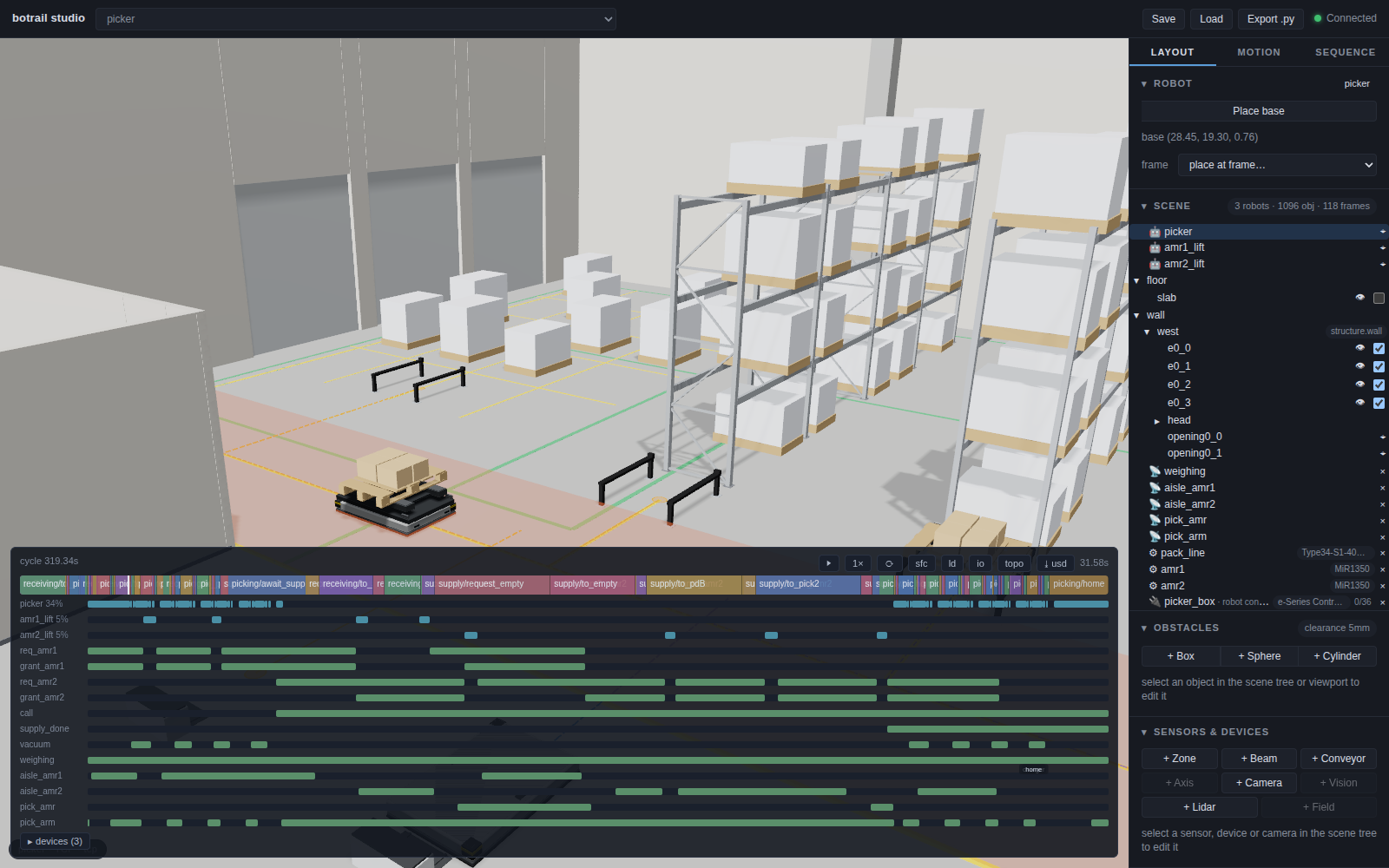
Two machines on one aisle are a traffic question, and the rollout makes
it a hard one: vehicles that meet while both drive are refused at the
instant and place they meet. What a fleet manager does has to be written
down as a program — each machine requests the aisle and drives on a grant,
and a small arbiter sequence hands the aisle to one at a time — and then it
shows on the timing chart as the wait it costs.
examples/vehicles/warehouse_demo.py runs a consultation sketch's three
flows this way, prints the call-to-supply time the picking station waits,
and refuses the shift with --no-interlock or --aisle 1.5 (a column, a
wall — by name). Without the arbiter, whether the machines meet is down to
when the picker calls — on schedule they happen to pass 1.7 m apart — so
--no-interlock also has the call come 15 s late, one case re-picked, and
the two meet; with the arbiter the same late call passes.
A forklift: the mast is the machine's own joints
An automated forklift (vehicle.forklift in the catalog) is the
semi-humanoid's shape of
machine with a mast where the arms were: one package, one robot, mounted
as the wheels of a vehicle with no body. Its forks are its +X — so a
station's arrive="forward" puts the forks into a pallet — and its mast
is a planning group named mast whose joints a ramp drives, free lift
first, then the stages. The pallet is attached to the fork seat, the
frame the package calls its TCP.
truck = bt.Robot.from_catalog("sae160")          # Toyota Autopilot SAE160, TX Hi-Lo mast
wheels = bt.Wheels.from_catalog("sae160")        # drive: tricycle — one steered drive wheel
scene = bt.Scene(truck, name="agf")
scene.add_vehicle("agf_base", body=[], path=PATH, stations=STATIONS, start="charger",
                  speed=0.31, reverse_speed=2.22,         # forks first / drive-unit first, the sheet's
                  allow_reverse=True, prefer="reverse",
                  arrive={"recv": "forward", "bay1": "forward", "home": "reverse"})
scene.mount_robot("agf_base", robot="agf", wheels=wheels)

sq.step("seat", actions=[bt.seq.ramp({"free_lift": 0.0115}, 0.05, robot="agf")])   # up to the stringers
sq.step("hold", actions=[bt.seq.attach(p, link="forks", robot="agf") for p in pallet_pieces])
sq.step("raise", actions=[bt.seq.ramp({"free_lift": 1.592, "mast_lift": 1.52}, 17.0, robot="agf")])
Three things the package settles for the cell:
- Where it pivots. A tricycle turns about its fixed axle — the support
arm wheels — and the package's
base_framestands there, so the vehicle frame sweeps the drive unit round exactly as the type sheet's turning radius says (the builder checked that figure against the geometry). With a statedreverse_speeda corner takes the gear that has the leg done soonest, so the truck turns round to back down an aisle at 8 km/h and drives the last metre into a bay forks first. - How high it goes. The mast's travel adds up to the sheet's lift height less the lowered fork height, and the sheet's own rule for an automatic load station (h23 − 200 mm) is what a cell refuses a level by.
- What the forks enter. A pallet from
bt.parts.palletis EPAL 1 timber: the forks and the support arms run between its bottom boards and under its stringers, and every tick the truck drives they are checked against it, against the beams the pallet lands on, and against the racking across the aisle. - What the cell asks of it.
scene.requirements()["agf"]reads the truck's line the way its type sheet is written:lift_height_mmfrom the highest position the cycle's ramps put the fork seat at,fork_height_lowered_mmfrom the lowest (the pockets of a pallet on the floor),payload_kgfrom the pallet and the cases lifted as one hold, and both gears —max_speed_mpsdrive unit first,max_speed_fork_first_mpsforks first. A truck sketched as a package with amastgroup and no arm is shopped for in thevehicle.forkliftaisle with those numbers (see Selection).
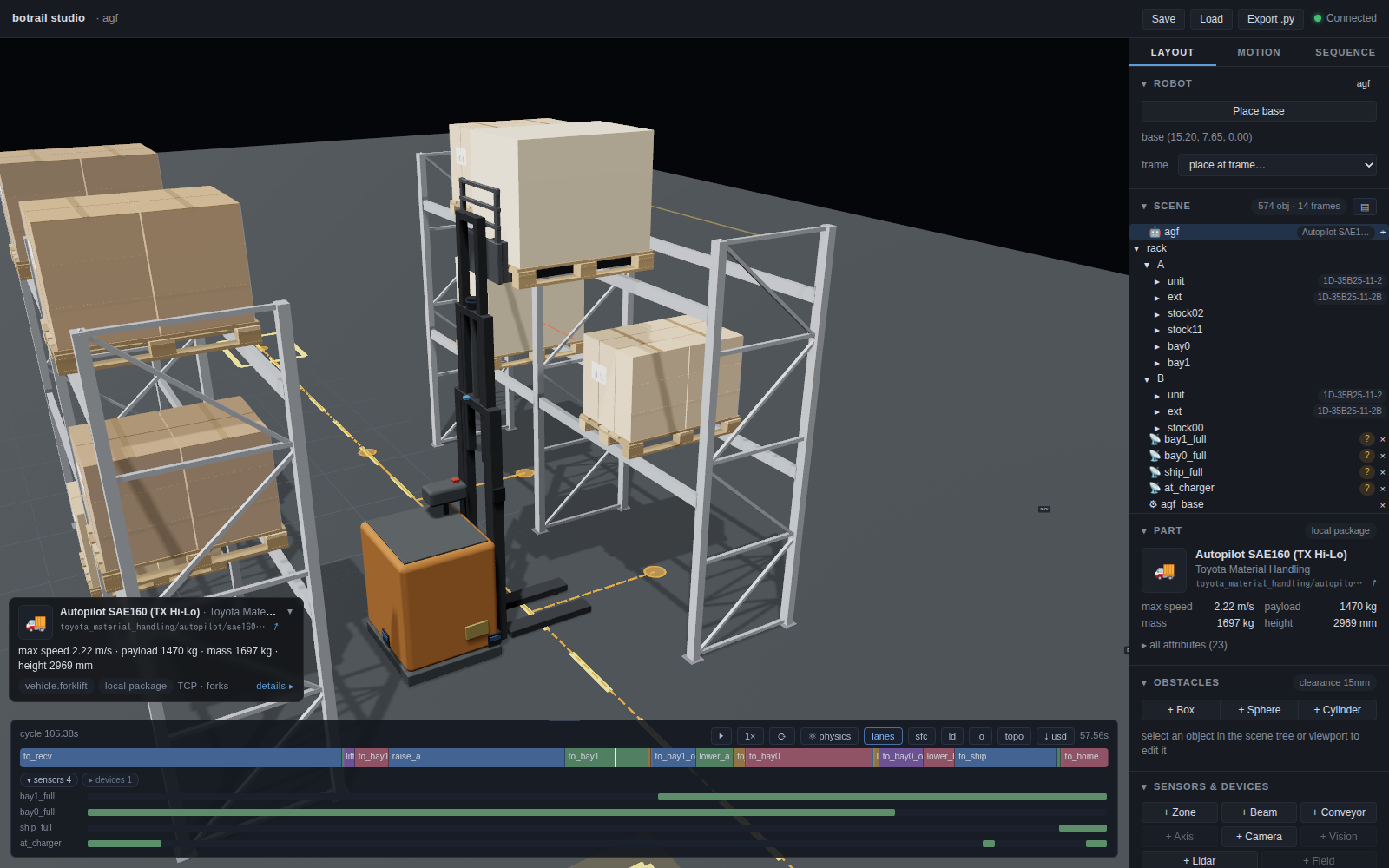
examples/vehicles/forklift_demo.py puts a received pallet on the upper
beam level of TRUSCO racking, takes another out to a shipping spot and
backs the truck onto its charger; --aisle 2.5 is refused against the
racking across the aisle at a named time, --sweep finds the aisle the
sheet quotes, --mast dx is refused for level 2 by the sheet's rule, and
--turn-radius 0.6 drives the same route as a truck that cannot pivot
would — arcs, an overshoot into each bay, and a lane far enough off the
rack for the forks to clear a pallet before the swing.
The robot is the vehicle: a semi-humanoid
A humanoid upper body on a wheeled base is sold, modelled and loaded as one
machine — arms, torso, head and wheels in one joint tree. It needs no new
kind of thing: the vehicle has no body (body=[], the robot's own links are
what the aisle check drives), and the robot is mounted as that vehicle's
wheels.
robot = bt.Robot.from_catalog("unitree/g1/g1-d")
wheels = bt.Wheels.from_catalog("unitree/g1/g1-d")      # joints, radii, base frame, travel posture

scene = bt.Scene(robot, name="g1d")
scene.add_vehicle("base", body=[], path=[(0, 0), (4, 0), (4, 3)],
                  stations={"dock": 0, "bench": 2}, speed=0.8, drive=wheels.vehicle_drive)
scene.mount_robot("base", robot="g1d", wheels=wheels)
Written out, the declaration is the wheel joints and their rolling radii, and the frame that stands on the floor:
wheels = bt.Wheels({"left_wheel_joint": 0.085, "right_wheel_joint": 0.085},
                   base_frame="base_footprint")
What wheels= changes, compared with bolting the same robot on as cargo:
- The wheels turn, exactly. Each wheel joint turns by the distance its
hub travelled over its radius — forward on a straight, opposite ways
through a pivot, backwards when the vehicle reverses, not at all on a lift
ride. Which way a joint's axis points does not matter: mirrored wheels
both roll forward. A mecanum wheel states its rollers' handedness
(
{"fl_wheel": (0.076, -1), ...}), a swerve module its steering joint (steer={"wheel_1": "steer_1"}), which is aimed along the travel by the shorter turn. It is the same closed form as wheel appearance, on joints instead of obstacles: no forces, no slip. - It bakes with everything else. The turning goes into the robot's joint track alongside whatever ramps run on the way — raise the torso and tuck the arms while driving — and is in the studio and in exported USD.
- The mount is the wheels' only driver. A ramp or a motion that names a wheel joint is refused; arms and torso plan as groups, which leave the wheels out.
- The machine stands on its base frame. With no offset given,
base_framerides the vehicle frame — on the floor, under the turn centre. Without a base frame the wheels' contact plane under their centroid is used. - It is put in its posture.
wheels.posture(a package'stravelposture by default) is taken up as the machine is mounted, the way a gait mounts a walker in its stance. - A walkable floor is rolled on, not hit. A building's slab, a lift
car's floor or a mezzanine deck is an obstacle, and the wheels are links
resting on it. Mark the floor
walkable(scene.set_obstacle_walkable("slab", True)) and the rolling machine gets the pass a walking one gets; an arm riding an AMR never does. - It is one purchase. The BOM lists the robot and neither the vehicle nor a controller box — even when a footprint box stands in for the body.
A model whose wheels are part of the chassis mesh has no joints to turn and
still declares that it rolls: bt.Wheels(base_frame="base_footprint").
The rules of mounting an arm hold: a planned
motion waits for device_done, a ramp runs on the move.
A semi-humanoid picks a shelf walks through
a cell built this way — the torso ramped, then the arm planned, from the
low board of a bay to its top one.
Legs instead of wheels
A quadruped or a humanoid is the same vehicle with a gait on its mount:
scene.mount_robot(device, robot=..., gait=bt.Gait(...)), and the goto
that dispatches the vehicle is what makes it walk. See
Legged robots.
What this does not model
Worth stating plainly, because the vocabulary invites bigger expectations:
- No navigation — no SLAM, no dynamic obstacle avoidance, no route planning.
- No fleet dispatch or traffic management. One vehicle's deterministic cycle is in scope; deciding which of twenty vehicles goes where is not.
- No docking error, wheel slip, protective-field slowdowns or battery.
- No acceleration model: vehicles move at constant speed. If your machine's ramp-up distance is a large fraction of a leg, derate the speed you give it rather than using the spec maximum.
For arrival variation, sweep it rather than sampling it — see
parameter sweeps and
examples/vehicles/agv_sweep_demo.py, which prints how late a dispatch may be before
the cell starts waiting on it.
Examples
examples/vehicles/agv_cell_demo.py— an AGV serving the factory cell: called while the arm picks, held outside the gate by an interlock, loaded on the deck, released once its own load sensor says it has the part.examples/vehicles/semi_humanoid_demo.py— a semi-humanoid from the catalog (or the primitive one,--robot semi) taking the low and the top board of a bay in one trip, a carton per hand: its wheels turn with the drive, its torso folds on the way home, its head camera gates each pick, and the requirements say how low and how high the machine has to work.--compareputs every machine (a bowing G1-D, a squatting RB-Y1 on differential and on mecanum wheels, an AI Worker's lift column on swerve modules, a Galbot G1's folding leg on omni wheels, a Galaxea R1 Pro's four-joint torso on swerve modules) in front of one bay: the torso posture teaching chose, the cycle time, and for the ones that do not make it the board they miss and by how much. The four holonomic ones get the cell a base that never turns needs: the stand on the bay's side of the aisle, and a crab between the two.examples/vehicles/amr_demo.py— a carrier, an arm and a gripper straight out of the catalog: the machine fetches a part from a bench in the aisle, carries it on its own deck, and hands it to a conveyor in a machining bay, folding the arm away on the move.--carrier NAMEswaps the base;--comparebakes the same cell on every mobile base the catalog ships.--studioopens the baked cycle after export; the RB-KAIROS wheels rotate during travel, including sideways travel with--holonomic.examples/vehicles/agv_sweep_demo.py— dispatch delay and dock depth as deterministic response curves.examples/vehicles/warehouse_demo.py— a 40 m warehouse from a consultation sketch: two MiR1350 carriers with the EU pallet lift on Nord pallet stands, TRUSCO racking, a UR20 case picker on a Makitech belt; the sketch's three flows, the aisle check against the customer's 3.0 m figure, traffic control for two machines on one aisle, and--outfor the document set.examples/vehicles/forklift_demo.py— an automated forklift (a catalog Toyota Autopilot SAE160) putting a received pallet on the upper beam level of TRUSCO racking and taking one out to a shipping spot: forks-first into pallets, drive- unit-first down the aisle, the mast a planning group ramped at the sheet's speeds.--aisle 2.5is refused against the racking across the aisle,--sweepfinds the aisle the sheet quotes,--mast dxis refused for level 2 by the sheet's own rule, and--out DIRwrites the document set.