Assembly and fastening
A cobot fits a cover over its dowels and screws it down — the cell every
screwdriving-tool vendor shows. botrail says it in the vocabulary it
already has: a fit is an attach, a move and a detach; a fastening is
that same carry for the screw and then the screwdriver's own stroke
running it down at the thread's feed, while the driver's program —
one more PLC program scanned beside the robot's — times the rundown from
the screw's pitch and answers OK or NOK. Threads, torque curves and
cam-out are not simulated: the numbers are data with a source, the
motion is geometry, the result is a signal.
import botrail as bt
A = bt.assembly

screw = A.iso4762(5, 20)                                   # M5×20, class 8.8
threads = A.BoltPattern([A.Hole(f"h{i}", xy, "threaded", depth_mm=13) for i, xy in enumerate(HOLES)])
clearances = A.BoltPattern([A.Hole(f"h{i}", xy, "clearance", 5.5, grip_mm=10) for i, xy in enumerate(HOLES)])
joint = A.joint(scene, "cover_joint", a="set/housing", b="set/cover",
                pattern_a=threads, pattern_b=clearances, fastener=screw,
                seat=((hx, hy, top), (0, 0, 0, 1)), thickness=0.010,
                torque_nm=(4.0, 5.0), min_engagement_mm=10)
driver = A.driver(scene, "driver", robot="arm", bit="drv_bit", shank="drv_shank", stroke=0.055,
                  fastener=screw, torque_nm=4.5, cycles=len(joint.order) + 1)
sq = scene.sequence("assemble")
fastening = A.fasten(sq, joint, driver, feeder, motions={...})
tl = scene.simulate_sequences(["assemble", driver.program])
rows = A.fastening_report(tl, fastening)
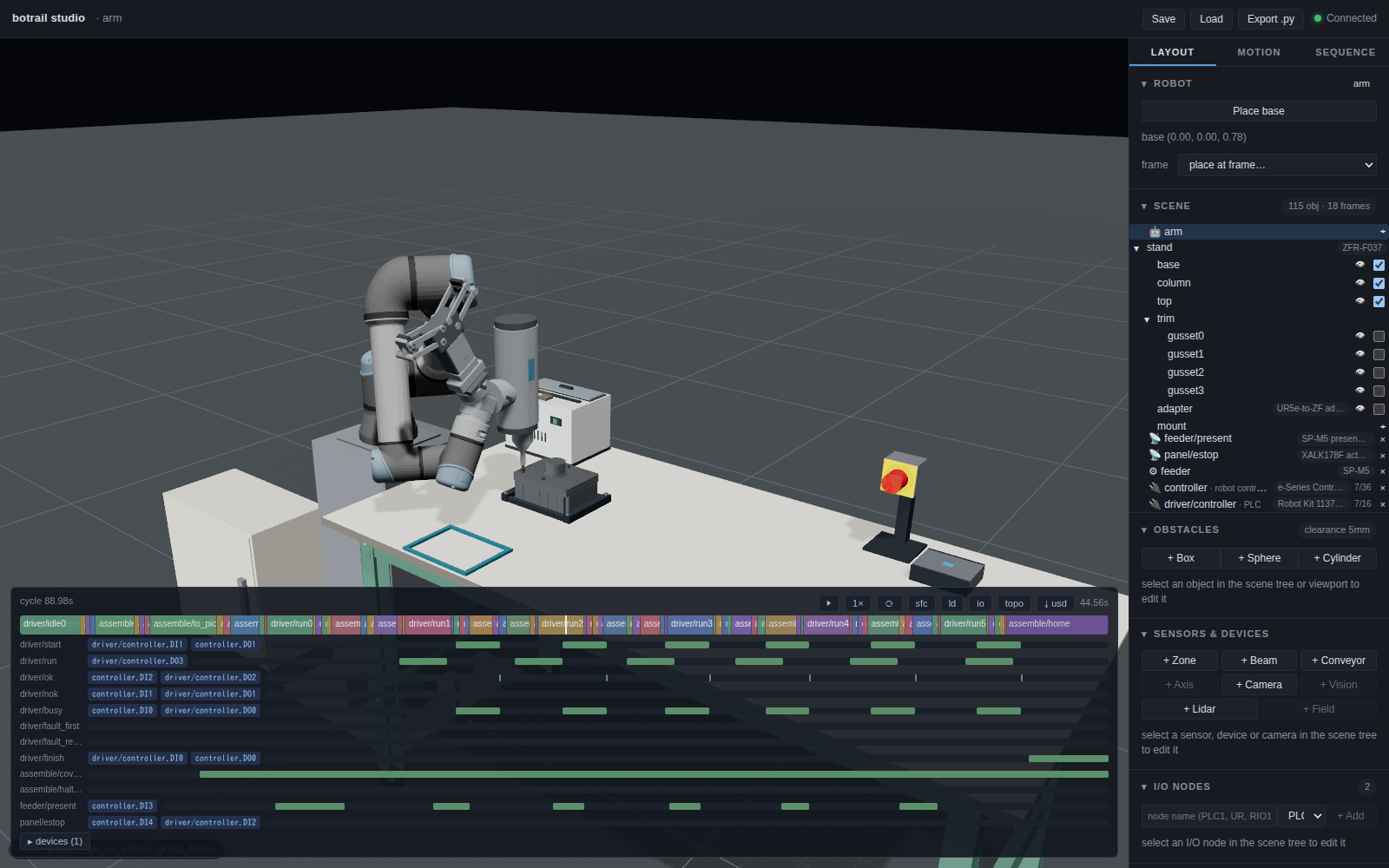
The worked example is
examples/assembly/cover_bolting_demo.py:
a UR5e on a catalog robot stand with an OnRobot RG6 and Screwdriver 103961
on a Dual Quick Changer v3, a screw presenter at its elbow, and a gear housing whose cover
takes six M5 screws in a star pattern.
The joint as a drawing states it
bt.assembly.joint declares what a drawing
does: the threaded holes of one part (their usable depth, an
unthreaded lead), the clearance holes of the other (the grip under
the head), the locators (dowels and their holes), the screw
(Fastener — iso4762
tables the socket head cap screws M3–M12), the torque the joint is
designed for and the engagement it needs. From that it derives what
the cell uses:
- one frame per hole,
<joint>/hole/<id>, on the cover's top face, +Z out — a screw is driven by aiming the tool tip's +Z along it, the way a spindle's tip aims along a toolpath;<joint>/seatwhere the cover's underside lands; - the tightening order (
star_order): opposite pairs through the centroid, the innermost first — the middle pair of a rectangular cover, then its diagonals; 1, 5, 3, 7, 2, 6, 4, 8 on a ring, as flange practice (ASME PCC-1) has it; - the engagement (length − grip − washer − thread start) and the tip's depth against the hole's bottom.
A joint the screw cannot make is refused when it is declared, with the numbers: an M5×16 through a 10 mm cover engages 6 mm where the joint asks 10. The reference torque for a class at μ = 0.14 (ISO 898-1, the usual VDI 2230 figures) is carried as a ceiling; the joint's own value is what a tapped aluminium housing is tightened to.
The driver's program
bt.assembly.driver authors the screwdriver's
controller as a program of its own — the way a machine tool's is in
machine tending. On driver/start it finds the
drive, runs the screw down at its rpm for exactly the time the thread
takes (length plus the approach gap, at pitch × rpm), pre-tightens,
final-tightens a third of a turn at 40 rpm, then answers driver/ok or
driver/nok and holds busy until the start drops. driver/run is on
while the bit turns — what the studio's spin effect binds to. With an
E-stop lane no run is admitted while it is pressed, which is the
interlock table's row.
The result is OK unless a scenario says otherwise: driver/fault_first
fails the next run, driver/fault_retry the one after — the two faults
a fastening's retry branch is tested with. The program is as many
rundowns as starts it may serve (cycles), nested so it ends on
driver/finish — a signal the robot's program raises when it is done —
from whichever cycle it is waiting in.
The driver's datasheet figures (tool={"torque_nm": (0.15, 5.0),
"screw_length_mm": 50, "bit_mm": 4} — the demo reads them off the
screwdriver pack's BOM row) are what
check compares the joint against: an M6
class 8.8 joint at its 10.5 N·m table torque is more than a 5 N·m cobot
screwdriver delivers, and the check says so before anything is taught.
The hand and the presenter
The demo takes the OnRobot Dual Quick Changer v3 109878, the Screwdriver
103961 configured with its Type A 50 mm bit extender
(onrobot/screwdriver/103961-a50) and the RG6 from the catalog and
stacks them with attach_tool: the driver on the changer's flange_a,
the gripper on flange_b, the gripper last so it stays the TCP. The
driver is supported at its side; the extender clears the cover's bearing
boss. Both tools stay attached and the robot selects one by turning its
wrist. The product notes
record the packs' source drawings, the required Compute Box route and
unverified hardware loads.
Like the generic bt.tools.screwdriver,
the catalog tool has a prismatic shank: its own feed advances the
screw while the arm stands still. Its tip has +Z pointing back along
the tool, the axis convention every process tool follows. The gripper stays the TCP; the bit's tip is
what screw poses are taught for (link=). Only the bit is allowed to
touch a screw (allow_link_obstacle_contact), and the screw a bit
carries is attached to it. scene.add_spin("driver/spin", driver.signal("run"), "arm", link="drv_bit")
turns the bit in the studio while the driver's run lane is on — a
presentation effect, like a weld flash, that draws nothing else.
bt.parts.screw_feeder is a screw
presenter: a box with a magazine row inside and a pick point on its top
face. It is an indexing Source — each bt.seq.start("feeder") puts
the next screw on the pick point, exactly one per request — with a zone
sensor feeder/present over the point, on while a screw stands there
and off when the bit lifts it away. The screws themselves are
bt.parts.bolt obstacles — a shank with its tip
at the origin and a head on top, one obstacle each (a magazine of one
screw lands on the bill as one line with a count), made with
Fastener.place from the standard's
figures. bt.parts.compound makes such a
one-obstacle shape from several primitives — a cover plate with its
bearing boss is another.
The program
bt.assembly.place appends the fit: the
taught approach, the descent, the gripper's close (a
grasp_close derived from the mesh), the
attach, the carry, the seat, the release.
bt.assembly.fasten appends the screws, one
per hole in the joint's order: request a screw, pick it (the bit a
millimetre into the socket), carry it over its hole, engage (the tip a
gap above the face), raise start, ramp the shank down the screw's
length in the thread's time while the driver runs, wait for OK. On NOK
the shank backs out and the run is repeated up to retry times; a last
NOK releases the screw where it stands, raises <program>/halted and
stops the program there — the refused cycle a FAT row wants. The taught
motions are named per screw ("screw_over_{hole}"), so a teach loop
over joint.order is all the demo writes.
What the bake says
fastening_report is one row per
screw, facts then checks, in grasp_report's form: how far off its
hole's axis the screw engaged and at what tilt, how far it went down,
how long the drive took, how many attempts and the result — and the
figures no bake changes, the engagement and the tip depth and the torque
against the joint's. fit_report says
where the cover landed against its seat.
Handing over
The document set is the one every cell gets (hand over the cell) with three pages the joint adds.
The tightening sheet. export_sheet
writes one line per screw in the order it is driven: hole, screw,
thread, length, class, head, engagement, torque, the rundown time and
the step that runs it — with the baked result columns (offset, seat,
drive time, attempts, result) when given the report, the driver's
timing per screw, and how many screws were driven. Markdown for the
review, CSV for the torque-tool's setup.
The interlock table. Two guards a reviewer looks for are written
into the program rather than assumed. place raises
<program>/<part>_seated when it lets the part go, and
fasten(after=[placement.seated]) picks the first screw only once that
signal and the presenter's present are both on; and while the driver
has an E-stop lane, the engage move completes — and start is raised —
only with it released. On the table
(Scene.interlocks) they read:
| to_pick0 | (feeder/present AND assemble/cover_seated) | motion screw_to_pick (arm) |
| start0   | (DONE(screw_engage_h5) AND NOT panel/estop) | driver/start := TRUE |
and the driver's own gate, driver/start AND NOT panel/estop, is the
row below them.
The report's assembly section.
report_section turns the joint,
the driver's timing, the fit and the fastening rows into a section the
cell report carries (scene.cell_report(..., sections=[...])) — as
Markdown under its own heading and as JSON under sections, so a
regression test reads report.sections[0]["json"]["screws"] the way it
reads report.footprint.
The FAT rows. Each fault is a scenario, and each run must refuse the cycle rather than let it through:
| scenario | what is injected | where the run stalls |
|---|---|---|
nok_once |
the driver answers NOK once | passes — the retry drives it |
nok_twice |
NOK twice | halt0: the screw released where it stands, assemble/halted up |
estop_pressed |
bt.io.stuck(estop, True) |
engage0: no start raised, the driver at idle0 |
feeder_empty |
the screws moved out of the magazine | feed0: no present, the arm waits |
start_wire_open |
bt.io.open(driver.signal("start")) |
run0: the arm raised it, the driver never heard it |
The bill carries the six screws as one line, the I/O list the handshake as wires between the arm's controller and the driver's, the PLCopen export the driver's program on a resource of its own.
Ordering from the catalog
--catalog on the demo takes the presenter, screws and workpiece set
from their packs, with the joint dimensions read from the workpiece.
The OnRobot tooling uses the same commercial product references in both
modes; its changer and driver geometry are authored from public drawings.
work = bt.parts.workpiece(scene, "set", (hx, hy, bz), catalog="botrail/workpiece/gear-cover-set/r1",
                          cover_at=(sx, sy, bz))                        # housing, dowels, cover
screw = A.Fastener.from_catalog("botrail/fastener/iso4762-m5/r1", length_mm=20)
joint = A.joint(scene, "cover_joint", a=work.housing, b=work.cover, seat=work.seat,
                catalog="botrail/workpiece/gear-cover-set/r1", fastener=screw)
feeder = bt.parts.screw_feeder(scene, "feeder", (fx, fy, bz), screws=len(joint.order),
                               fastener=screw, catalog="botrail/feeder/screw-presenter-m2-m6/r1")
A workpiece set is a spec pack whose mounting declares the joint
in the vocabulary tool mountings use — the housing's top face as the
flange side with its threaded holes and dowel pins, the cover's
underside as the mount side with its clearance holes, the fasteners
with the joint's torque and the engagement rule —
bt.parts.workpiece stands the parts from it
(the pins where the flange face's locators say) and
joint(catalog=...) reads the holes, the
screw, the torque range, the engagement and the thickness from the same
declaration. A fastener pack sells lengths and property classes;
Fastener.from_catalog carries
its article number, mass and the class's reference torque, and every
screw placed from it lands on the bill under that number. A
presenter pack sells rail sizes; the feeder takes its body, pick
point and present_s from it and can fill its own magazine
(screws=6). The screwdriver carries its manufacturer's model,
part number and specifications through set_part (tool.screwdriver:
torque range, thread range, screw length, stroke, bit). Mount it with
attach_tool before the gripper, since the last tool's declared TCP is
the assembled hand's default TCP.
What the packs add to the check: the screws carry their joint's torque
on the bill once fasten declares it, and
scene.requirements() derives what the screwdriver line
must deliver — torque_nm, screw_length_mm, thread_max_mm /
thread_min_mm — against its declared specifications. An M6 class 8.8 joint at
its 10.5 N·m table torque comes out short on a 5 N·m cobot
screwdriver; the M5 joint at 4.5 N·m comes out ok.
Fitting is a contact the check knows about
A part being fitted meets what it is fitted into — the cover rests on
the housing and its dowels, the screw goes into the cover and the
housing — and without a word the collision check would refuse every one
of these. Scene.allow_object_obstacle_contact
is that word, the carried-object counterpart of
allow_link_obstacle_contact: while the object is attached it may meet
the named obstacle — anywhere (place(..., touch=[...]) declares the
housing and the dowels for the cover), or only within a window: the
carried object's origin within a radius of a line, its own +Z within an
angle of it. fasten declares one window per screw, the hole's axis and
the hole's tolerance_mm, for both parts of the joint. So the engage
move — a collision-checked straight line that puts the screw's tip a few
millimetres into the hole — passes on the hole and is refused 2 mm off
it, by name (screw5 x set/cover); and the clearance measure over the
cycle names what the cell really came closest to, not a screw in its
hole. Like every allowance, toolpath rapids ignore it. The allowance is
the scene's, saved in the project and written by the Python export.
What is not simulated
Threads are not contact: the rundown after the engage move is the tool's own stroke, a ramp, which the collision check does not read — as it does not read a gripper's close. The report says how far the screw went down; the joint's figures say whether it engages. Torque curves, cam-out, cross-threading and the presenter's mechanics are data and signals, not physics.