Hand over the cell
Walks through examples/engineering/cell_deliverables_demo.py
— one script, the whole document set. Runs on the primitive-geometry arm from
the checkout, no downloads.
A robot cell is not delivered as a simulation. It is delivered as a layout drawing, a bill of materials, an I/O list, the control logic for the PLC, a robot program, a review animation, and a page of numbers somebody signs off on. In most toolchains those live in five programs and drift apart the day the layout moves. Here they are all derived from one scene — so they cannot disagree with each other, or with the bake that verified the cell — and this tutorial writes every one of them:
cell.botrail        cell_bom.csv     cell_interlocks.md  cell_report.json  pick_cell.script
cell.plcopen.xml    cell_bom.md      cell_io.csv         cell_report.md
cell.py             cell_cycle.usda  cell_layout.dxf     cell_topology.mmd
                                     cell_layout.svg
The cell
The pick-and-branch cell of the robot program example — a six-axis arm, a conveyor, a photo-eye, a spec-gauge branch, and a UR controller wearing the I/O — furnished with scenery and identity so the documents have something to say:
def furnish(scene: bt.Scene, fence_pitch: float = FENCE_PITCH) -> None:
    """Scenery and identity: the controller cabinet and the reject bin, a
    fence around the cell with a door gap on the south side, and what each
    piece of equipment *is* (`set_part`) — the identity the BOM, the layout
    labels and the report are derived from. Nothing here changes the
    cycle."""
    # The control cabinet stands in the corner, ordered from the catalog:
    # the enclosure is an article of its own (body, plinth base, mounting
    # plate — three lines with masses and part numbers). The UR control
    # box stands by the east fence, its door towards the arm: the box on
    # the sheet, the `UR` I/O node the cycle wired and its BOM line are one
    # thing, and the 6 m robot cable it ships with is on that line. The
    # reject chute is a bin south-west of the arm, clear of the cabinet's
    # door — a bin in front of it would be a `service_space` warning.
    bt.parts.cabinet(scene, "cabinet", catalog="nito/fz/standard",
                     size=(0.6, 0.4, 1.6), position=(-0.85, 0.72), base_height=0.1)
    bt.parts.controller(scene, "UR", robots=["simple_arm"], size=(0.475, 0.268, 0.423),
                        position=(0.95, 0.55), yaw=-math.pi / 2, cable_m=6,
                        manufacturer="Universal Robots", model="CB3 control box")
    scene.add_box("chute", size=(0.3, 0.3, 0.4), position=(-0.35, -0.3, 0.2))
    scene.set_part("chute", model="BIN-30", category="bin")
    # A fence around the cell — panels of `fence_pitch` along each side, a
    # post at every corner and between panels, the door on the south side —
    # generated by `bt.parts`: every panel and post is an obstacle under
    # `fence/`, and the parts on the group carry the counts.
    bt.parts.fence(
        scene, "fence", path=[(-1.2, -0.6), (1.2, -0.6), (1.2, 1.0), (-1.2, 1.0)],
        height=1.8, panel_pitch=fence_pitch, door=(0, 1), door_model="ST20 door",
        manufacturer="TROAX", model=f"ST20 {fence_pitch:.1f}m", post_model="ST20 post", mass_kg=12,
    )
    # Equipment identity: the arm, the belt, the eye.
    scene.set_part("simple_arm", manufacturer="ACME", model="SA-6", mass_kg=28)
    scene.set_part("conv", manufacturer="MISUMI", model="GVL-900-200", mass_kg=32)
    scene.set_part("part_at_pick", manufacturer="KEYENCE", model="PZ-G61N")
Three things to notice. The fence is generated by
bt.parts.fence — panels and posts as
obstacles under fence/, the door its own obstacle, and the
parts on the groups carrying the counts —
so changing FENCE_PITCH changes the panel and post counts on the BOM and
the panels on the sheet together. The control cabinet is ordered from a
catalog spec pack: the enclosure, its plinth base and its mounting plate
are three BOM lines with article numbers and masses. The UR control box is
placed by bt.parts.controller: the box on
the sheet, the UR I/O node the cycle already wired (adopted, wiring kept)
and its BOM line — with the robot cable length on it — are one thing, and
without it the bill would still carry a
simple_arm/controller line
nobody had placed. And every set_part names a product without changing
the cycle at all — identity is a separate layer from geometry and
behaviour.
Writing the set
def deliver(scene: bt.Scene, out: Path) -> bt.CellReport:
    """Writes the document set into `out` and returns the report."""
    out.mkdir(parents=True, exist_ok=True)
    runs = scene.simulate_scenarios(["pick"], max_duration=30.0)
    baseline = runs["baseline"]

    files: list[Path] = []

    def write(name: str, fn) -> Path:
        path = out / name
        fn(path)
        files.append(path)
        return path

    write("cell.botrail", scene.save_project)                       # the portable project
    write("cell.py", lambda p: p.write_text(scene.generate_python()))  # the same cell as code
    write("cell_bom.csv", scene.export_bom)                         # bill of materials
    write("cell_bom.md", scene.export_bom)
    write("cell_io.csv", scene.export_io_list)                      # I/O list for the electrical drawing
    write("cell_topology.mmd", scene.export_topology)               # controller topology
    write("cell.plcopen.xml", lambda p: scene.export_plcopen(p, name="pick cell"))  # the logic, for the PLC IDE
    write("cell_interlocks.md", scene.export_interlocks)               # every output against the condition that admits it
    write("cell_layout.svg", lambda p: scene.export_layout(p, scale=200, title="pick cell"))  # plan view for the review
    write("cell_layout.dxf", lambda p: scene.export_layout(p, title="pick cell"))  # plan view for the 2D CAD
    write("cell_cycle.usda", lambda p: baseline.export_usd(p, fps=30.0))  # the baked cycle
    # The cycle's meshes ride beside it, one binary layer each, and are
    # part of the set the report hashes.
    files += sorted(p for p in (out / "cell_cycle_assets").rglob("*") if p.is_file())
    write("pick_cell.script", runs.export_script)                   # the controller program, both arms

    report = scene.cell_report(
        {"baseline": baseline, "ng_part": runs["ng_part"]},
        scenarios=runs,
        deliverables=files,
        title="pick cell",
    )
Each line is one existing export; the only new step is the last one.
Scene.cell_report takes the baked cycles, the
scenario sweep, and the files just written, and hashes them into the
report — so the report says, with digests, which drawing, which list and
which program belong to this cell.
Reading the report
# pick cell — cell report

| | |
|---|---|
| Robots | simple_arm (6 DOF, cabinet UR) |
| Cycle time | baseline: 11.75 s, ng_part: 10.97 s |
| Min clearance | 0.175 m at 0.00 s (baseline) |
| Footprint | 2.46 × 1.66 m (4.1 m²), height 1.80 m |
| I/O | 4 points (2 DI, 2 DO), 0 unbound, 0 finding(s) |
| BOM | 11 lines, 0 unidentified, cable_m 6, mass_kg 258 |
| Scenarios | 2/3 passed |
| Deliverables | 12 files hashed |
The rest of the page is the detail behind each line: step spans and robot
utilization per cycle, the I/O counts and node usage, the scenario table
(the stuck-beam row stalls, and says where), the BOM by category, the
footprint, and the deliverables with their SHA-256. All of it is also
cell_report.json — same numbers, one stable shape — which is what a
regression test or an agent reads:
report = demo.deliver(demo.build(), out_dir)
assert report.cycle_time("baseline") <= 12.0
assert report.io["unbound"] == 0
assert report.bom["unidentified"] == 0
assert report.footprint["area"] <= 5.0
The sheet and the list
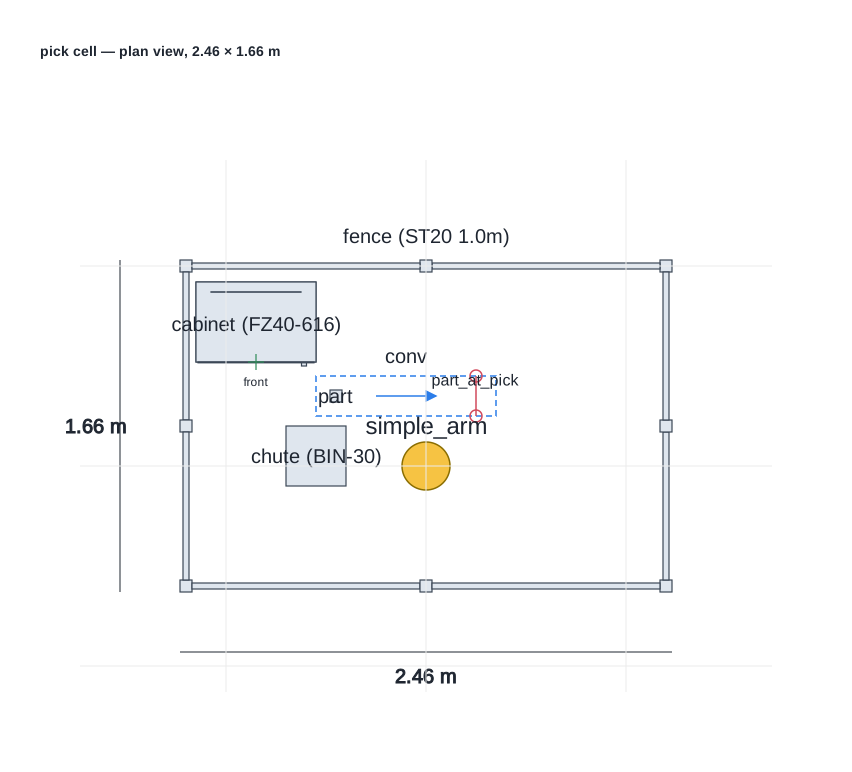
The layout sheet is the scene from above — footprints, the robot base, the conveyor zone with its direction of travel, the beam, the fence labelled as one thing — as SVG for the review and as DXF for the plant's 2D CAD (the guide lists what goes on which layer):
The BOM has a line per product, merged and counted, with the totals the parts declared:
| # | category | manufacturer | model | catalog | qty | description | names | base_height_mm | cable_m | color | depth_mm | height_mm | installation | ip_rating | mass_kg | material | mount | width_mm |
|---|---|---|---|---|---|---|---|---|---|---|---|---|---|---|---|---|---|---|
| 1 | robot | ACME | SA-6 |  | 1 |  | simple_arm |  |  |  |  |  |  |  | 28 |  |  |  |
| 2 | conveyor | MISUMI | GVL-900-200 |  | 1 |  | conv |  |  |  |  |  |  |  | 32 |  |  |  |
| 3 | sensor.photoelectric | KEYENCE | PZ-G61N |  | 1 |  | part_at_pick |  |  |  |  |  |  |  |  |  |  |  |
| 4 | robot_controller | Universal Robots | CB3 control box |  | 1 |  | UR |  | 6 |  |  |  |  |  |  |  | floor |  |
| 5 | structure.cabinet | 日東工業 | FZ40-616 | nito/fz/standard/r2@936d6a2167834f86161a6c093808550d043d221f | 1 | FZシリーズ・スタンダードタイプ (自立形キャビネット) | cabinet | 100 |  | ライトベージュ塗装 (5Y7/1) | 400 | 1600 | 屋内 | IP55 (片扉) / IP54 (両扉)、カテゴリー2 | 80 | 鉄 (扉 2.3 mm / ボデー 1.6 mm) |  | 600 |
| 6 | structure.cabinet.base | 日東工業 | FCX-Z40610ZA | nito/fz/standard/r2@936d6a2167834f86161a6c093808550d043d221f | 1 |  | cabinet/base |  |  |  |  |  |  |  | 13 |  |  |  |
| 7 | structure.cabinet.plate | 日東工業 | FCX-Z40616T | nito/fz/standard/r2@936d6a2167834f86161a6c093808550d043d221f | 1 |  | cabinet/plate |  |  |  |  |  |  |  | 21 |  |  |  |
| 8 | bin |  | BIN-30 |  | 1 |  | chute |  |  |  |  |  |  |  |  |  |  |  |
| 9 | structure.door |  | ST20 door |  | 1 |  | fence/door |  |  |  |  |  |  |  |  |  |  |  |
| 10 | structure.fence | TROAX | ST20 1.0m |  | 7 |  | fence |  |  |  |  |  |  |  | 12 |  |  |  |
| 11 | structure.fence.post |  | ST20 post |  | 8 |  | fence/posts |  |  |  |  |  |  |  |  |  |  |  |

Totals: cable_m = 6, mass_kg = 258
Why hashes
Because the set is derived from one source, it is a unit. Run the script
again and every file is byte-identical. Move the photo-eye and exactly the
layout sheet and the generated Python change — the BOM and the I/O list do
not. Add a fence panel and the BOM changes too. The repository's own test
suite pins that behaviour by name
(python/tests/test_deliverables.py),
which is the regression a document set could never have when each document
was typed in by hand.